Whiteboard + project management · Product
ColaBoard
From sticky note to shipped, on one board.
A collaborative whiteboard where ideas become tasks, tasks land on a live Kanban and Gantt chart right beside them, and your whole team plans together in real time. No copying notes into another tool after the meeting.
Runs in your browser, installs as an app. Already using it? Open your boards.
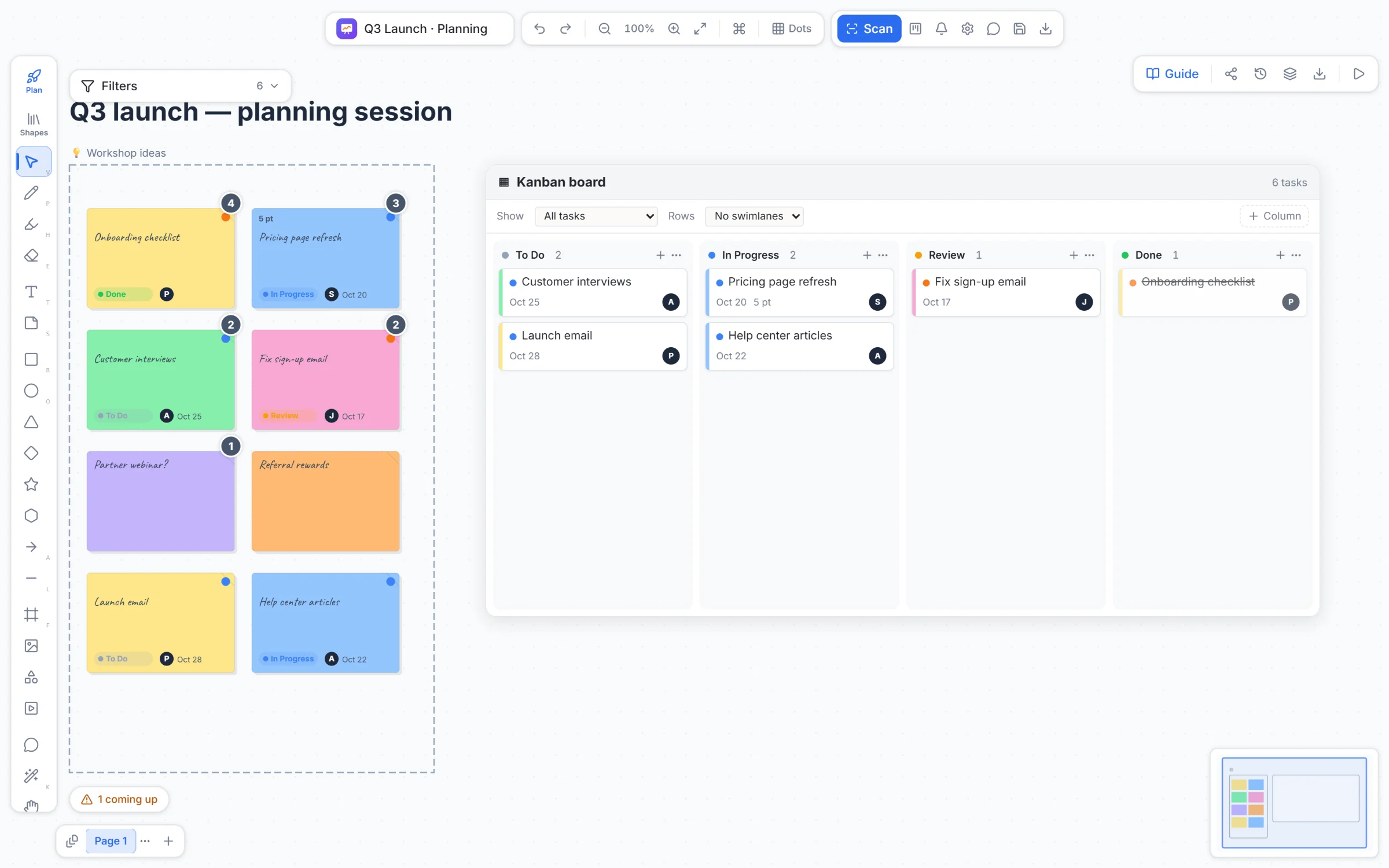
Not another mind map
A mind map that becomes the plan.
Traditional mind maps and whiteboards are great for thinking and stop there: the picture gets exported, the actions get retyped into a project tool, and the context is lost. Project tools track work but leave no room to think. In ColaBoard the map is the project. Turn a connected map into tasks with subtasks, and the branches you drew become the structure you run, with owners, dates and a Gantt chart.

Whiteboarding becomes project management
The session ends. The project has already started.
Every step happens on the same canvas, so nothing gets lost between the workshop and the work.
- 01
Capture
Brainstorm on sticky notes, paste a list, or grow a mind map as fast as you can think.
- 02
Choose
Dot-vote as a team. The winning ideas become task cards in one click.
- 03
Plan
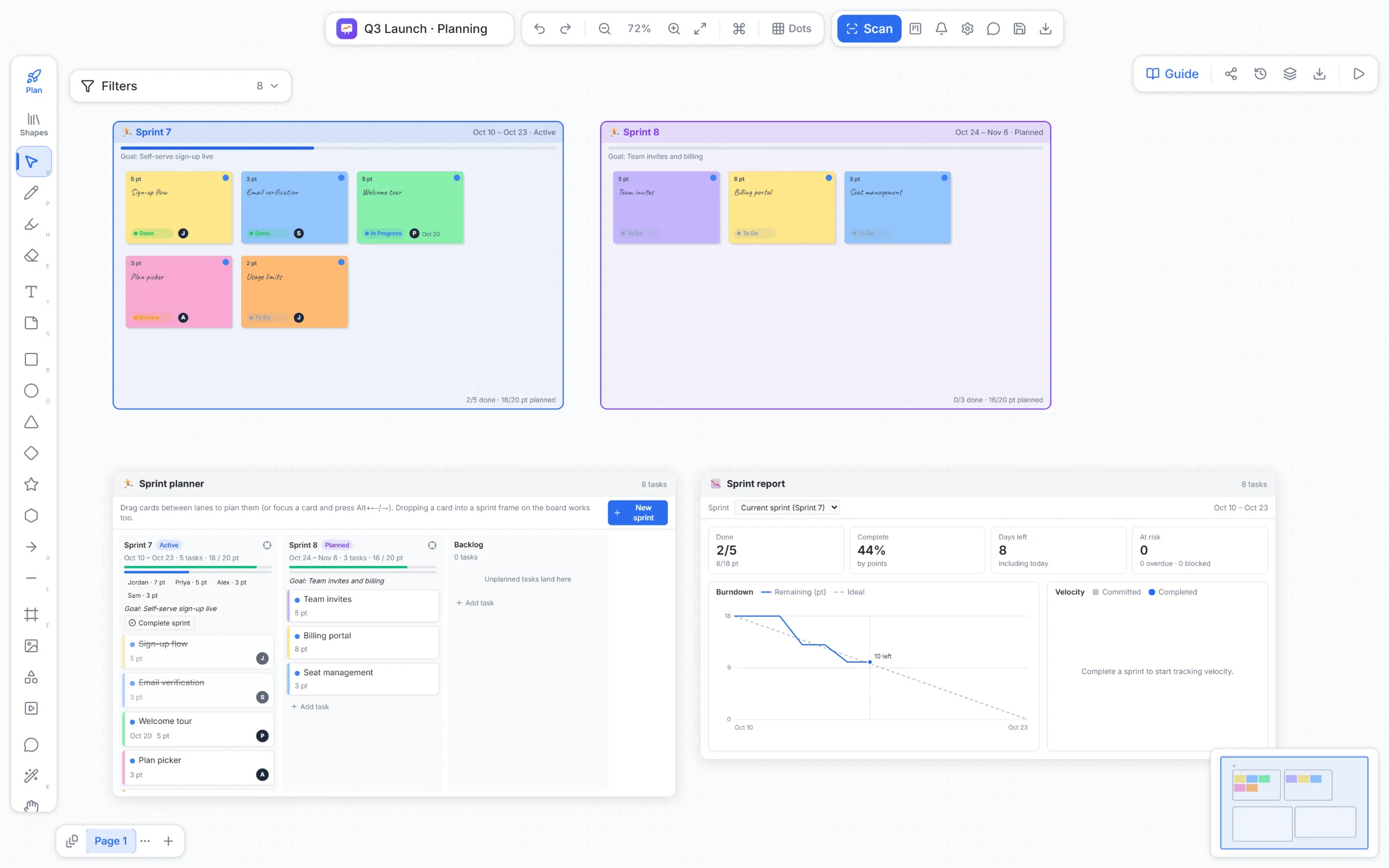
Drop a live Kanban, Gantt chart or sprint planner right next to the ideas they came from.
- 04
Track
Move cards, link dependencies, check project health and share a status update.

Project management feels like a session
Plan the work the way you brainstorm it: together, on the board.
Project management usually means one person updating tickets after everyone else has left. In ColaBoard the plan is something the team does live. Sprints are frames you drag cards into, the Kanban and Gantt chart sit on the canvas instead of behind a menu, and everyone can see, point at and change the plan in the same moment.
Everyone in the room
See each other's cursors, point with a shared laser, and bring everyone to the same spot on the board.
Run it like a workshop
A shared timer, dot voting and planning poker turn planning into a session, not a form to fill in.
Sprints you can see
Sprints are frames on the board: drag a card in to plan it, with capacity, burndown, velocity and a sprint review.
Present and share
Present frames as slides, then export every page of the board as a PDF for whoever wasn't there.
Made for the moments teams plan together
Where teams use it.
Sprint planning
Backlog, sprint frames, capacity and a timeline on one screen, with the whole team in the room.
Retrospectives
Start / Stop / Continue, vote on what matters, and leave with owned action items.
Discovery and roadmaps
Map ideas, journeys and opportunities, then shape the winners into a roadmap you can track.
Workshops and client sessions
Run the session live, present frames as slides, and export every page as a PDF afterwards.
Pages, like sheets
Keep ideas, plans and retros on separate pages of one board, and view tasks across all of them.
Scan a real whiteboard
Photograph a physical whiteboard and turn it into editable notes and shapes.
Works anywhere
Install it as an app, keep working offline, and it syncs when you are back.
Nothing to learn by guessing
Hover help on every control, a guided planning flow and templates to start from.
Bring your next planning session to ColaBoard.
Start with a template (brainstorm, retro, sprint planning, mind map or a blank page) and invite your team.
Screens show a demo board with fictional tasks and people.