One revenue story for Sales and Marketing.
MAM is marketing attribution that lives inside Salesforce. It follows every buying journey from the first marketing touch to closed revenue, counts the sales work in between, and puts both teams on the same numbers.
Core benefits
The answers leadership keeps asking for.
Which campaigns produce revenue, what they cost, and what it took Sales to close them, all in the CRM your teams already work in.
See marketing's impact all the way down the funnel
Pipeline and won revenue by campaign, channel, source, medium and content, with UTM detail on the first and latest touch of every journey.
Know what every campaign really costs
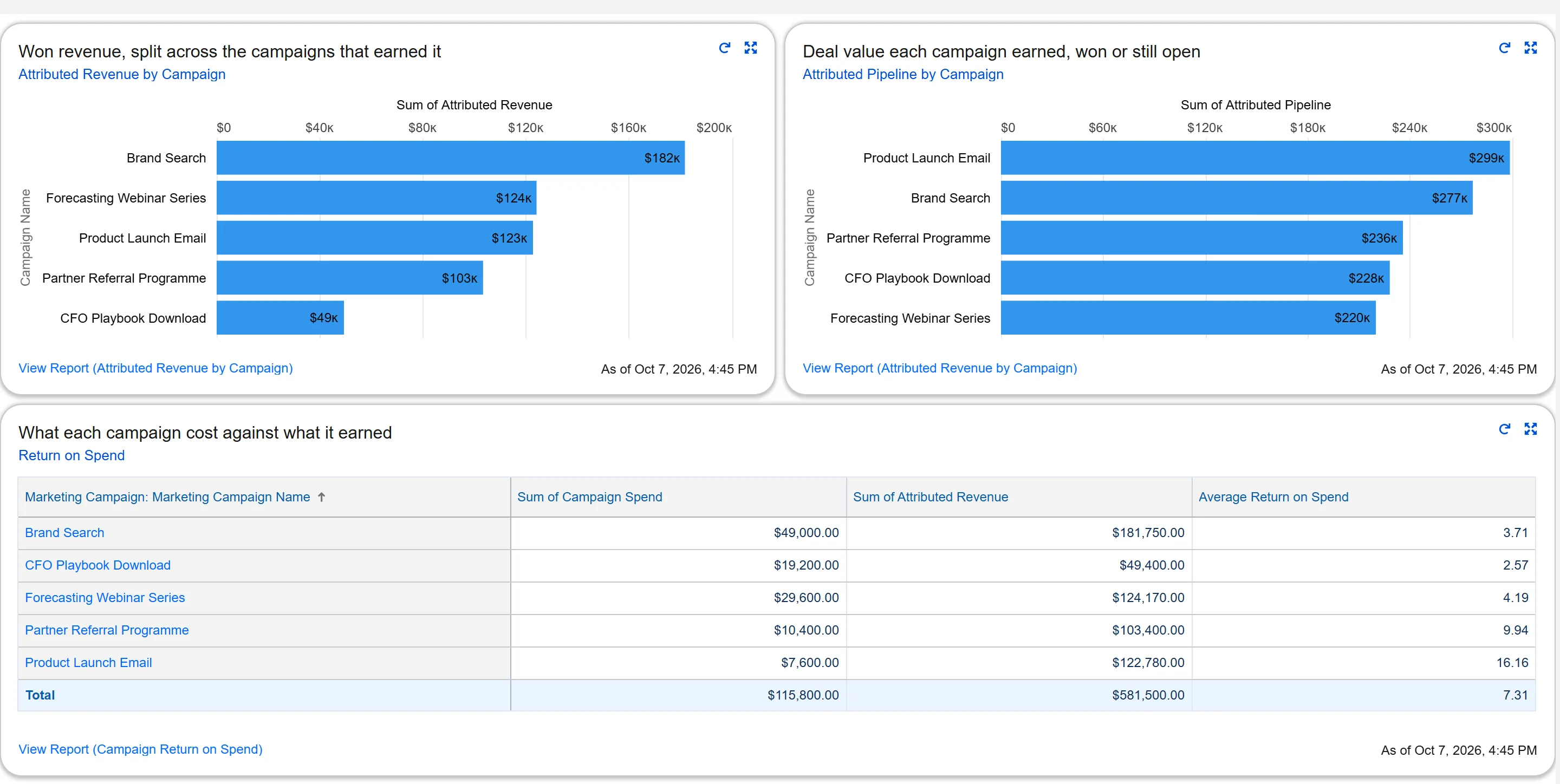
Cost per MQL, cost per SQL and return on spend on each campaign, with spend tracked by month or by transaction.
Credit that matches how you sell
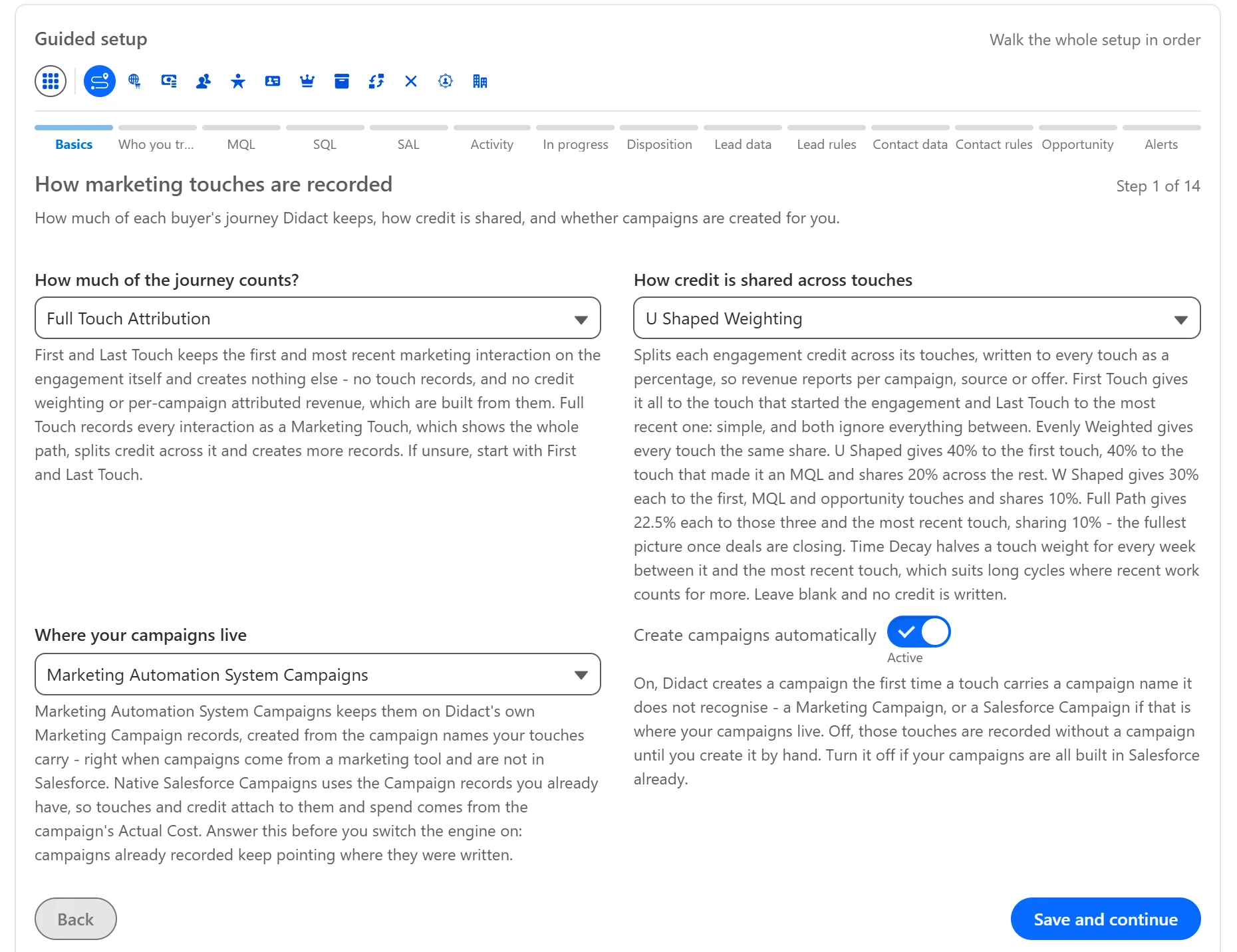
Seven weighting models, from first touch to time decay. Change the model and existing journeys are re-split in the background.
Speed to lead, measured
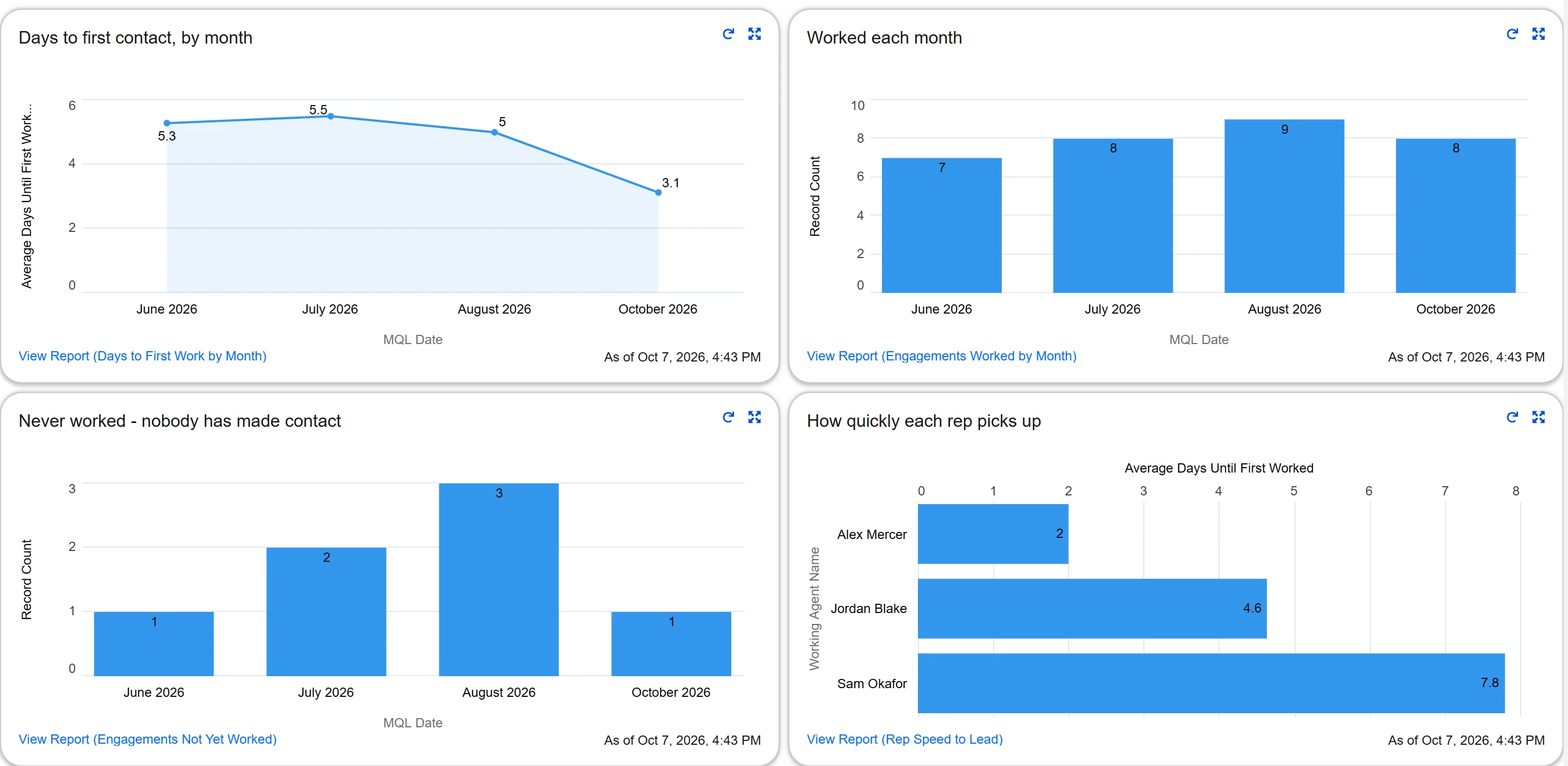
Days until a lead was first worked, plus a ready-made report of MQLs Sales never touched, so follow-up gaps surface on their own.
Rep-level accountability
Every journey records who accepted it, who qualified it and who closed it, alongside the calls and emails it took to get there.
Reporting ready on install
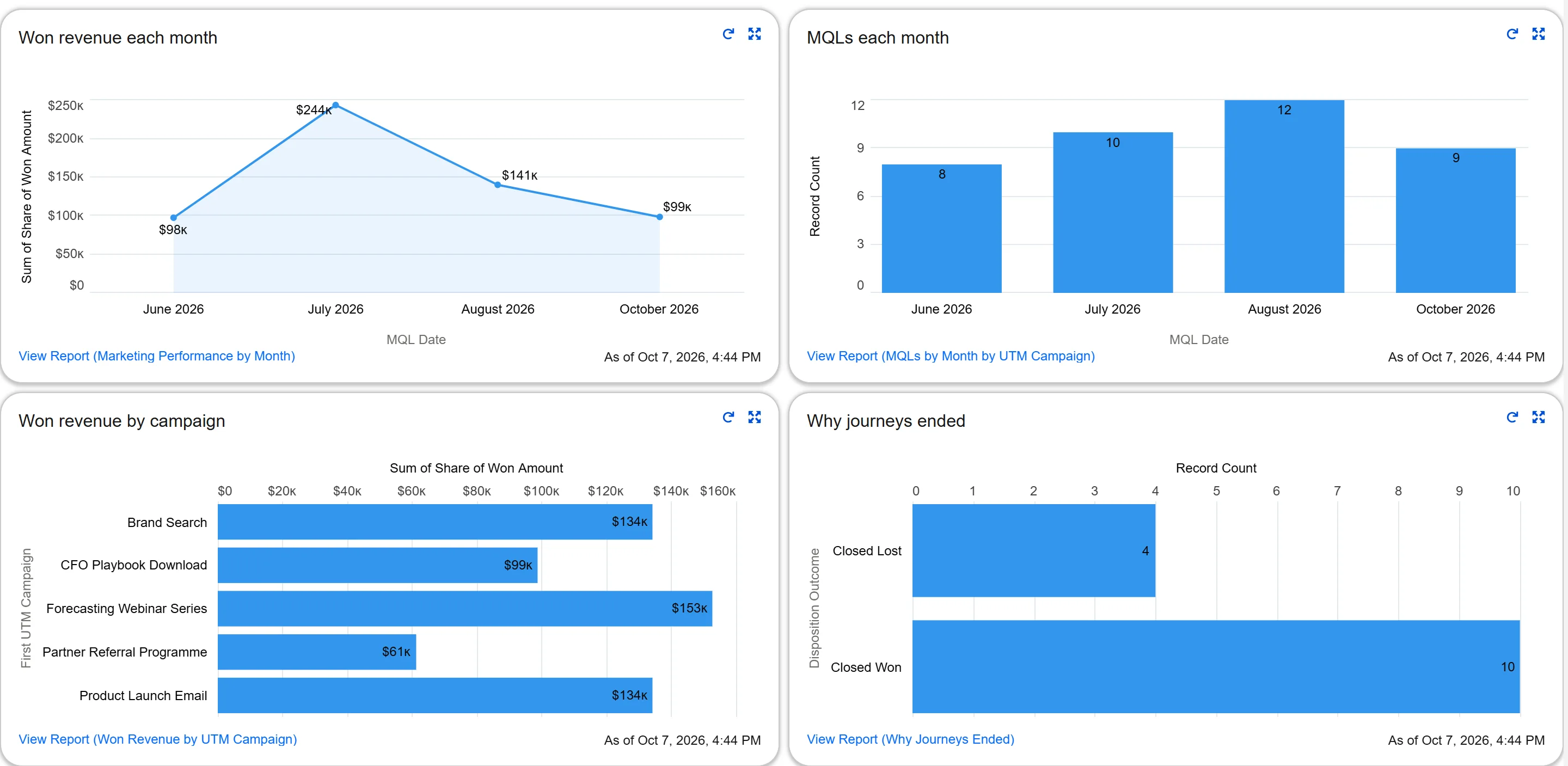
83 reports and 19 dashboards, from overall marketing performance to sales effort on engagements and UTM performance across every dimension.
Sales and Marketing, aligned
End the argument over whose number is right.
Most attribution tools tell Marketing's story. MAM records Sales' side of the same journey, so both teams see the work that turned a lead into revenue.
What Marketing gets
- Spend tied to pipeline and closed revenue, campaign by campaign
- Which sources produce deals, not just leads
- Budget conversations backed by numbers Sales agrees with
What Sales gets
- Credit for deals Sales started before any marketing, flagged as Sales Initiated
- Which campaigns produce leads worth working, and what it takes to convert them
- Calls and emails counted as part of the story, not left out of it
What both teams share
- One set of MQL, SAL and SQL definitions, configured once for leads, contacts, opportunities and accounts
- Every stage date stamped once, never moving backwards, so the numbers stop shifting between meetings
- Dashboards both teams open together, like Sales Pipeline with Marketing
What makes MAM different
More complete data, without another platform.
Attribution is only as believable as the data behind it. MAM captures the whole journey, marketing and sales, on the records your team already trusts.
| Capability | MAM | Standalone attribution tools |
|---|---|---|
| Where the data lives | Inside your Salesforce org, on records your team already uses | Often a separate platform working from a synced copy |
| Sales effort | Calls and emails counted against each journey | Usually marketing touches only |
| Campaign spend | Monthly or per-transaction spend, cost per MQL and SQL | Often a separate spend upload or a different tool |
| Who a journey belongs to | Leads and contacts, with account-based options | Often leads or contacts, not both |
| Deals with several journeys | Credit shared so a deal is never counted twice | Easy to double count |
| Context at each touch | A snapshot of the record at the moment of the touch | Typically the current value only |
How credit is split across touches
- First Touch
- Last Touch
- Evenly Weighted
- U Shaped
- W Shaped
- Full Path
- Time Decay
Illustrative splits. Time Decay weights later touches more heavily.
Plug and play, inside Salesforce.
Guided, screen-based setup
Choose your MQL rules, stage definitions, watched fields and weighting model in a setup flow. A readiness list flags anything missing before it matters.
Works with the campaigns you already run
Use native Salesforce campaigns, with spend from their actual cost, or your marketing automation system's campaigns.
Runs itself
Background jobs start on their own, campaign totals recalculate every night or on demand, and the same campaign membership is never recorded twice.
Self-correcting totals
Nothing depends on fragile roll-up fields. Totals are recalculated from the source records, so they correct themselves.
Your data never leaves Salesforce. MAM is a managed package that keeps every journey, touch and campaign on records inside your org.
Inside MAM
See it in Salesforce.
Real screens from a Salesforce org running MAM with demo data. Select any screenshot to enlarge it.
Swipe for more · 9 screens
With our implementation support
From kickoff to shared dashboards in as little as one to two weeks.
MAM can usually roll out in one to two weeks, depending on your current setup. It can take longer if your setup is more involved or you want to track more.
- Step 1
Discovery & field mapping
We review your Salesforce setup and choose the fields and campaigns MAM should watch, including gaps in your marketing automation sync.
- Step 2
Configuration & model setup
MQL rules, stage definitions and the weighting model are configured to match how your team actually sells.
- Step 3
Validation
Dashboards are reviewed against your current reports with your team until everyone trusts the numbers.
- Step 4
Go live & first insights
Marketing and Sales open the same dashboard and work from the same revenue story.
From finger-pointing to a single revenue story.
Mid-market B2B SaaS · 180 employees · Salesforce + HubSpot
Marketing spent. Sales sold. Nobody agreed on what worked.
The CMO presented one pipeline number. The CRO presented another. Every QBR turned into a debate about whose report was right, instead of a conversation about where to invest next.
We deployed MAM directly inside their Salesforce org, mapped a flexible multi-touch model to how they actually sell, and stood up a shared dashboard Marketing, Sales, and the executive team could open at the same time.
Within a quarter, the attribution debate was over. The conversation moved to doubling down on the channels and reps driving real revenue.
"For the first time, Marketing and Sales walked into the QBR looking at the same number. MAM didn't just fix our attribution. It fixed our meetings."
— VP of Revenue Operations
+38%
Marketing-sourced pipeline
in the first two quarters after rollout
12 days
From kickoff to live dashboards
replacing a stalled 6-month BI project
1
Shared revenue dashboard
used by Marketing, Sales, and the CRO
−61%
Time spent reconciling reports
hours returned to strategy, not spreadsheets
Featured customer story
How a SaaS tax software company saved hundreds of thousands per month and lifted conversion 40% with MAM.
Featured customer story
How MAM exposed the true cost of a "winning" Facebook campaign and prevented a costly hiring mistake.
Featured customer story
How MAM ended the Marketing vs. Sales debate by tracking every call and email on every lead.
Featured customer story
How MAM delivered a marketing win in under a month using existing Salesforce fields, with no custom builds required.
Featured customer story
How MAM turned attribution data into remarkably accurate revenue forecasts, predicting every lead's value by channel, campaign, and sales cycle.
MAM questions, answered.
What marketing and revenue leaders ask before deploying attribution.
Install
Already scoped? Install the package.
MAM is a managed package that installs by link, with no external warehouse to stand up. Most teams install into a sandbox or a Developer Edition org first and point it at real data before going near production. Current release: 1.45.0.1.
Install it
Pick the link that matches the org you are installing into. A sandbox rejects the production link and the other way round.
Then two things
Assign Didact Admin to whoever will configure attribution, and Didact User to everyone who only reads it. Nobody sees the app without one.
Then open the Console and work down the guided setup. It checks its own configuration and tells you what is still missing before anything starts recording.
Not sure it fits yet? Talk to us first. We scope and quote before anyone installs.
See your own revenue story in MAM.
We'll walk through MAM in a Salesforce org, then scope it for yours.
Also from RevOp Solutions
Pair MAM with Buyer's Journey
Personalize the buying experience and feed every touchpoint back into your attribution.